How to fix Unfortunately, nearby services has stopped.
After clicking on settings icon It pops up in a box and says, Unfortunately, nearby service has stopped. if you seeing this error when clicking on settings that mean there is an issue in your Samsung mobile.

Basic Solution: from update lollipop many requests I have found that many people are facing this issue on Samsung mobiles. my basic solution is to clear cache memory first then it can be fixed easily. otherwise,
To clear cache from android you have to follow following steps.
- You have to turn the phone off. Press and hold the Power key, tap Power off, and then tap OK.
- Put the mobile on recovery mode. Press and hold the Power key and Up Volume key at the same time.
- after 10 seconds release the Power key when the Samsung logo appears.
- After 5 seconds release the Up Volume keys when the Android image appears.
- Select wipe data. press the Down Volume key to select Wipe cache partition
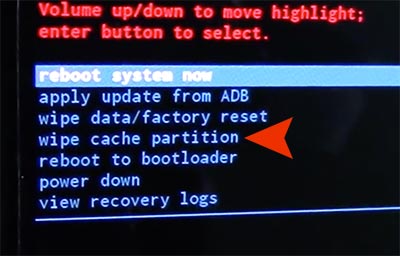
- Press the Power key.
- Once “Cache wipe complete” appears, press the Power key to select Reboot system now.
- The device restarts once the wipe is finished.
your mobile complate was qure...



0 Comments